

ZCSPlus EWS/MobileSync Installation Guide
In addition to using a web browser or mobile device to connect to ZCSPlus, connection is available using a web service, such as Exchange Web Services (EWS), or a desktop client such as ZCSPlus Connector to Microsoft Outlook.
### Messages and items
– Create, read, search, update, and delete items.
– Move and copy items between folders.
– Send existing or newly created messages.
– Handle messages, appointments, contacts, distribution lists, and tasks.
– Handle MIME content, text or HTML bodies, recipients, importance, categories, and supported extended properties.
– Create, retrieve, and delete attachments.
– Resolve names and expand distribution lists.
### Folders and synchronization
– Create, read, search, rename, move, copy, delete, and empty folders.
– Incrementally synchronize the folder hierarchy.
– Incrementally synchronize folder items.
– Preserve synchronization state on the server.
– Handle local folders, shared folders, and selected mailboxes hosted on another node.
### Calendar
– Create and update appointments and meetings.
– Handle invitations, replies, cancellations, and recurrence.
– Retrieve availability and free/busy information.
– Map EWS time zones.
– Retrieve rooms and room lists.
– Handle calendar attachments and reminders.
### Accounts and preferences
– Read and update out-of-office replies.
– Read and update compatible inbox rules.
– Add, update, retrieve, and remove delegates.
– Synchronize categories through “UserConfiguration/CategoryList“.
– Retrieve the password expiration date.
### Notifications
– Create EWS folder subscriptions.
– Report created, updated, moved, and deleted items.
– Poll changes with “GetEvents“.
– Answer “GetStreamingEvents” requests.
### Authentication and security
– HTTP Basic authentication delegated to the ZCSPlus authentication mechanism.
– Rejection of inactive accounts and accounts without “zimbraFeatureEwsEnabled“.
– Support for application-specific passwords when two-factor authentication is enabled.
– In-memory password cache limited to 15 minutes and invalidated after a password change or application-password revocation.
– SOAP requests restricted to “text/xml” and “application/soap+xml“.
– CXF service published below the “/service/extension/zimbraews” handler.
### Synchronization
– Synchronize mail, calendars, contacts, and tasks through EAS.
– Synchronize folder hierarchies and create, rename, or delete folders.
– Handle local, shared, and remote mailbox collections.
– Estimate changes and preserve incremental synchronization state.
– Fetch items, MIME content, and attachments.
– Move items and delete or expire synchronized content.
### Mail and calendar operations
– Send mail and process smart replies and smart forwards.
– Search mailboxes and resolve recipients.
– Process meeting responses, recurring calendar items, reminders, and attendees.
– Apply body-format, truncation, date-range, and MIME preferences negotiated by the client.
### Device lifecycle
– Provision devices and enforce compatible mobile policies.
– Maintain device state and synchronization metadata.
– Support heartbeat-based “Ping” notifications.
– Allow, block, quarantine, suspend, resume, remove, and inspect devices.
– Request or cancel complete and account-only remote wipes.
– Expose the administration SOAP handlers consumed by the MobileSync Zimlet.
## MobileSync Zimlet features
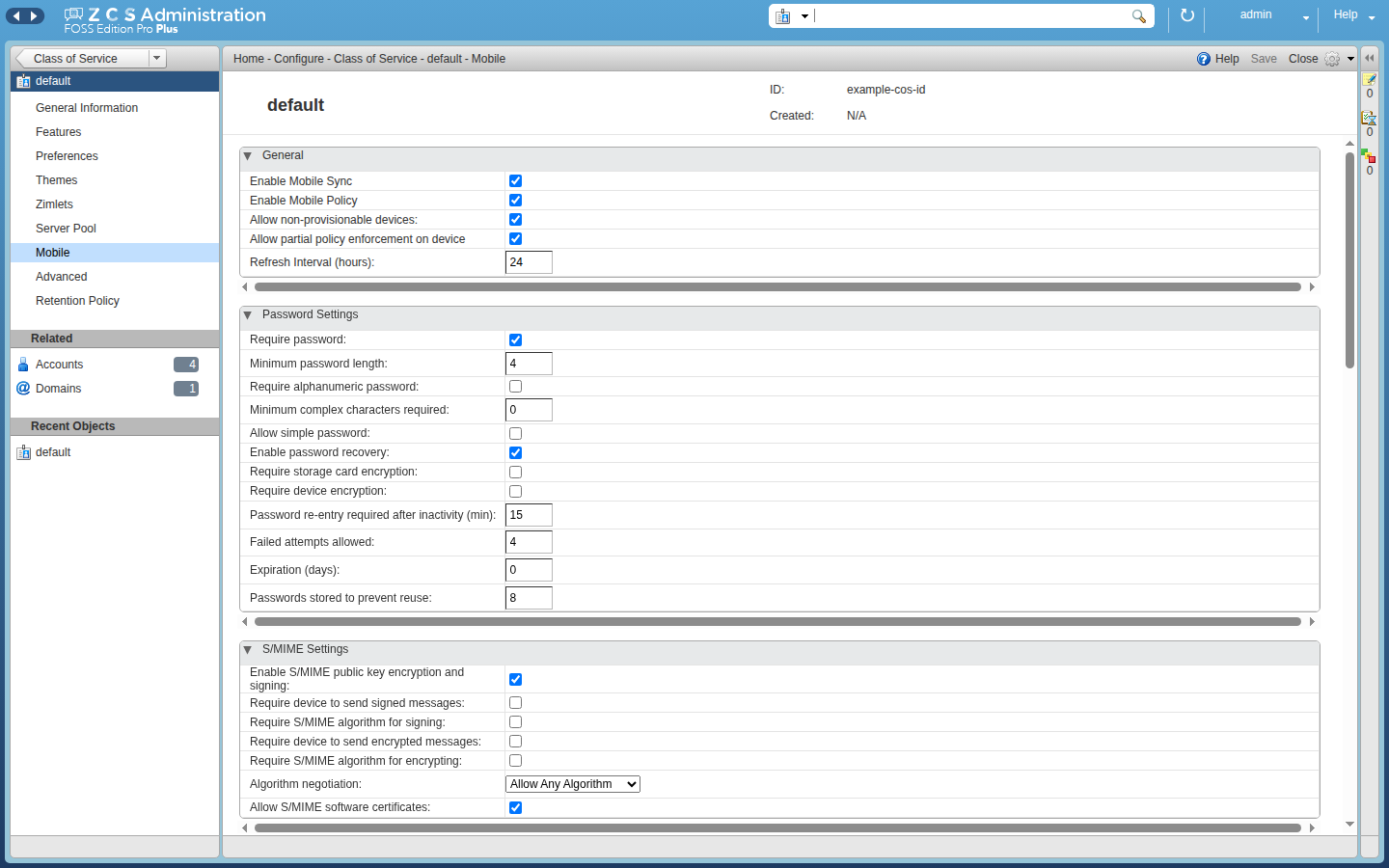
The Zimlet targets the “admin-domain” console and adds a “Mobile” tab to accounts, classes of service, domains, and global settings.
### Device administration
– List registered devices with their account, last activity, name, identifier, status, and EAS version.
– Search, filter, and sort devices.
– Suspend and resume synchronization.
– Block a device.
– Remove a device from the server database.
– Request a complete remote wipe or cancel a pending wipe.
– Remove only the synchronized account, or cancel that operation, with EAS 16.1 or later.
– Enable actions according to the current device state.
– Display explicit confirmation prompts before destructive operations.
### Mobile policies
– Enable MobileSync and mobile-policy enforcement.
– Allow non-provisionable devices or partial policy provisioning.
– Configure the policy refresh interval.
– Configure password length, complexity, expiration, and history.
– Lock devices after inactivity or repeated authentication failures.
– Require device and storage encryption.
– Configure S/MIME signing and encryption requirements.
– Limit the age and size of synchronized messages and calendar data.
– Control HTML messages and synchronization while roaming.
– Control removable storage, camera, Wi-Fi, Bluetooth, Internet sharing, and remote desktop.
– Control browsers, consumer mail, POP/IMAP, text messaging, unsigned applications, and unsigned installation packages.
– Maintain approved and blocked application lists.
Policies can be defined on a class of service and overridden on an account. The new-account and new-class-of-service wizards also include a Mobile step.
### Localization
The archive contains a default language and 37 translations, including French, British English, German, Spanish, Italian, Portuguese, Japanese, and several Chinese variants.
## Known limitations
– The service targets practical EWS client compatibility; it does not reproduce every Exchange server feature.
– The WSDL exposes the extended EWS interface, but some generated operations remain placeholders and return an empty response.
– Instant messaging, eDiscovery, application marketplace, legal hold, and team-mailbox operations are not implemented.
– Some extended properties, inbox-rule actions, and permission combinations have no ZCSPlus equivalent.
– The Zimlet depends on the MobileSync administration SOAP commands supplied by the server.
– MobileSync behavior depends on the EAS version and capabilities negotiated by each device.
– A remote wipe is destructive and takes effect only when the device next contacts the server.
Pour ce faire, il suffit de taper la commande suivante à partir de votre outil logiciel Ubuntu:
apt install zcsplus-ews
su - zimbra -c "zmprov fc all"
su - zimbra -c "zmmailboxdctl restart"