

ZCSPlus Backup/Restore Installation Guide
ZCSPlus offers the capability to set up legacy backups at the domain level. This guide outlines the steps required to configure ZCSPlus legacy backups specifically for a domain, ensuring data security and recovery.
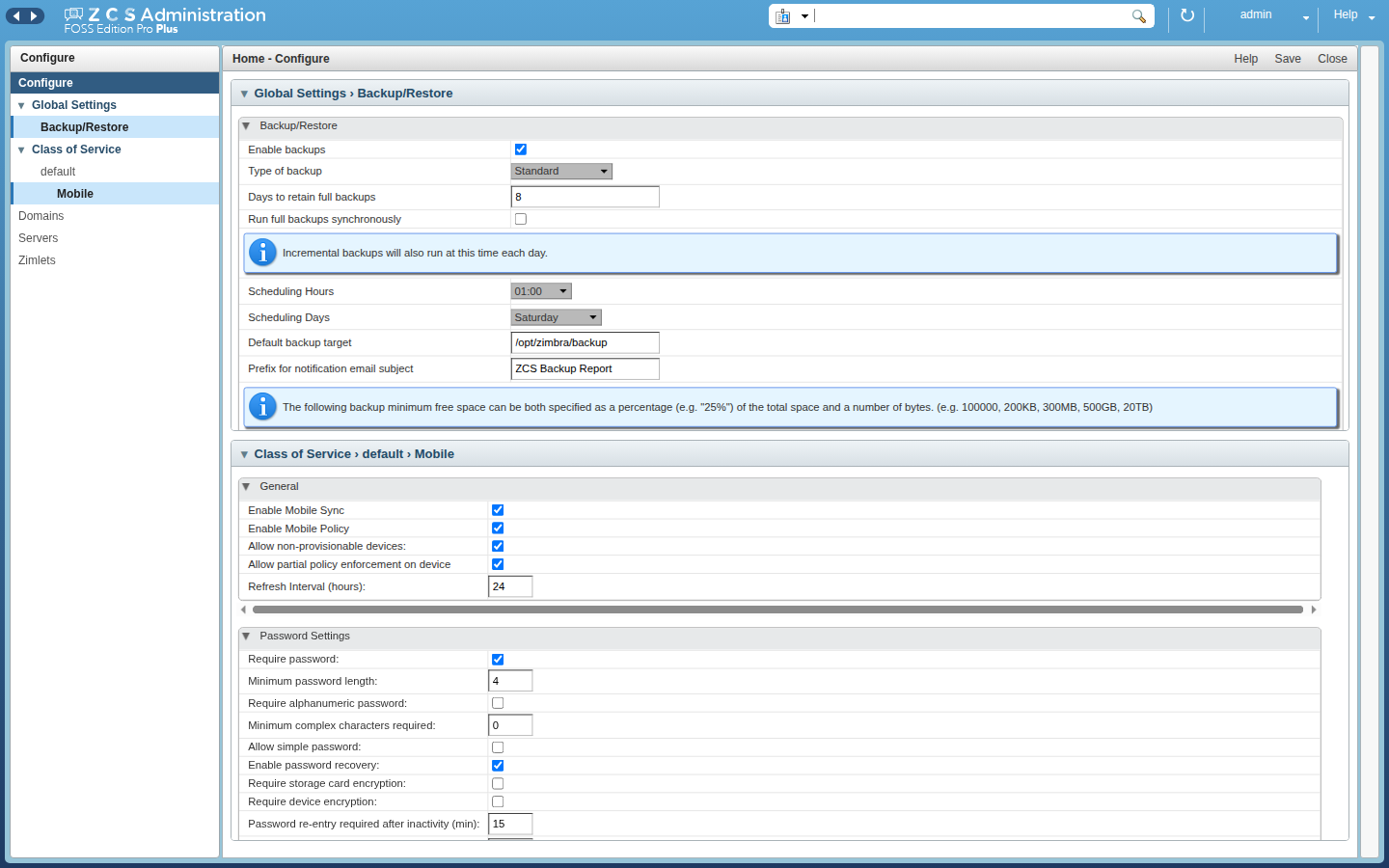
### Backup operations
– Run full or incremental backups.
– Back up every eligible account or an explicit account selection.
– Select accounts globally or by domain and class of service.
– Run an immediate backup from the administration console.
– Run full backups synchronously when requested.
– Abort a running backup.
– Delete backup sets up to a label, date, or retention period.
– Include or exclude blobs, blobs on secondary storage volumes, and search indexes.
– Protect the target with a configurable minimum-free-space threshold.
### Scheduling and modes
– Use standard full and incremental backup schedules.
– Configure scheduling days and hours.
– Use auto-grouped mode to distribute accounts across a configurable number of groups.
– Throttle automatic backups in auto-grouped mode.
– Configure the retention period for full backups.
– Apply backup settings to selected mailbox servers.
Incremental backups are not available in auto-grouped mode. Cross-session deduplication is also disabled for an auto-grouped run.
### Storage and deduplication
– Store backup sessions on a local or mounted filesystem target.
– Store blobs as individual files, compressed ZIP entries, or uncompressed “zipStore” entries.
– Deduplicate blobs within a backup session.
– Deduplicate blobs across sessions through common and delta backup sets.
– Compress deduplicated blobs with Zstandard or keep them uncompressed.
– Index deduplicated content with RocksDB.
– Copy files with serial, parallel, or piped I/O modes.
The extension does not add object-storage or backup-encryption support, protect backup targets with appropriate filesystem permissions, storage encryption, and an external copy policy.
### Monitoring and reporting
– List full and incremental backup labels.
– Display label state, start and end times, server, and error messages.
– Display per-account states and failed accounts.
– Display free and total space for each backup target.
– Send success or failure reports to configured recipients.
– Configure the report sender and subject prefix.
## Restore features
– Restore one account, a selected set, or all accounts.
– Include or skip accounts that were deleted after backup.
– Restore the latest available state.
– Restore to a selected full-backup label.
– Restore to a point in time, redo-log sequence, or incremental label.
– Replay incremental backups and current redo logs.
– Ignore redo replay errors when explicitly requested.
– Skip delete operations during redo replay.
– Continue with other accounts after an account-level error.
– Preserve existing account names or create new accounts with a prefix.
– Include or exclude blobs, secondary-storage blobs, and search indexes.
– Restore directory data and mailbox data.
– Abort an active restore and report failed accounts.
– Optionally verify restored blob digests.
Point-in-time recovery depends on a valid full backup and the required incremental backups or redo logs, excluding blobs or indexes intentionally produces a partial restore.
### Backup and restore interface
– Add a Backup/Restore entry to the administration tools.
– Browse servers and their latest backup status.
– Inspect backup labels, account states, and errors.
– Start and abort immediate backups.
– Configure global and per-server backup settings.
– Create a missing target directory after validation.
– Run the mailbox restore wizard and monitor its progress.
### Message recovery
– Enable message recovery globally or by domain and class of service.
– Configure deleted-message retention.
– Configure automatic purging.
– Limit how long deleted messages remain visible to users.
Message recovery configures the platform dumpster mechanism, it is separate from restoring an entire mailbox from a backup set.
### Mailbox move
– Move an account between mailbox servers.
– Export the source mailbox to the target server.
– Verify that the directory record points to the destination.
– Open the moved mailbox for verification.
– Purge the old mailbox from the source server after confirmation.
– Query active move operations and their state.
The extension also registers authenticated mailbox export and import endpoints below “/service/extension/backup/“, these endpoints are intended for server-managed mailbox moves, not anonymous archive downloads.
### Localization
The archive contains a default language and 37 translations, including French, British English, German, Spanish, Italian, Portuguese, Japanese, and several Chinese variants.
## Authentication and security
– Backup SOAP operations require the “backupAccount” administration right.
– Restore SOAP operations require the “restoreAccount” administration right.
– Mailbox moves require the relevant account or calendar-resource right and the source/target server move rights.
– Redo-log rollover requires its dedicated administration right.
– Mailbox import and export endpoints require an authenticated administration token.
– Server-side checks protect account and server lookups from unauthorized enumeration.
– The extension registers the backup entitlement and checks the compatible license state before sensitive operations.
To do this, simply type the following command from your Ubuntu software tool:
apt install zcsplus-backuprestoreWe also recommend that you type the following commands, to avoid page loads with 429 errors and thus the impossibility of making ZCSPlus Backup/Restore visible:
su - zimbra -c "zmprov mcf zimbraHttpDosFilterMaxRequestsPerSec 100"
su - zimbra -c "zmprov fc all"
su - zimbra -c "zmmailboxdctl restart"